
In setting up my CI/CD pipeline for some demo Docker containers recently, I ran into a frustrating, yet puzzling issue while trying to get Docker Swarm working. Indeed, it left me like "Johnny" Number 5 from the movie Short Circuit with questions, queries, and posers.
First, a quick high-level overview of my network setup. As a software engineer, I often find myself needing multiple different environments for my work. For example, I might find myself working on a project where another developer using a set of packages on Ubuntu does not have an issue, while my preferred configuration on RHEL behaves slightly differently, or just as often, needing specific configurations for my working remotely. And rather than use multiboot on a laptop/tower PC, or dedicating a physical machine to that setup, I just spin up a virtual machine and install what I need on it. It is the same technique used in computer rooms and data centers around the world, and actually reduces the overall cost, energy use, and heat output.
Also, being someone who has dealt with Internet security and performance, I long ago learned the importance of segregating machines on different subnets, or on more modern networks with the right switch, with different layer 2 802.1Q VLANs, with a firewall handling the routing between them. This segregation allows me to setup different networks, such as having one network for WiFi guests, one for my PC/laptops, one for machines associated with work, one for my volunteer MEDUSA development for the TRMN, and most importantly a DMZ where my web servers (and thus, this site) run.
When I put all this together, thanks to two large Dell rackmount servers and managed Gigabit Ethernet switches, my network topology looks something like this:
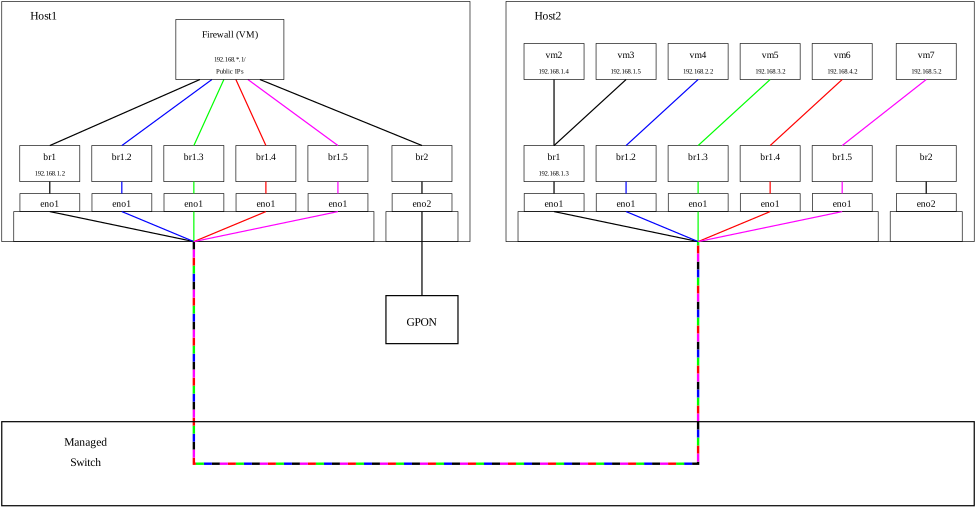
My actual network is slightly different, with the diagram only showing one of my switches, and the networks and virtual machines are for discussion purposes only (I have many more virtual machines on a few more VLANs). But each solid line color represents a different VLAN, and the multicolor line represents a network connection where the different VLANs share the connection thanks to the way the packets are tagged. I have also simplified things by not showing additional network interfaces, such as the loopback interface, or those created by Docker, nor do I show the Docker containers, which are just a different type of virtual machine.
When I started the process of setting up Docker Swarm, I originally installed Docker on what is Host2 in the diagram. After all, as I just noted, containers are just a different type of virtualization. And one of the first things I setup was a local registry to store my local images which I would then deploy to an "internal" swarm for my use, as well as an "external" swarm essentially residing on my DMZ where I would deploy a copy for demo purposes [1]. This registry, listening on port 5000, was on what in this diagram would be the black VLAN as say vm2, and let's say the red VLAN is the DMZ, where the "external" swarm would run. Once that was done, I quickly built a swarm service for my job application tracker using docker compose on another VM, pushed it up to the registry server, and deployed the two containers associated with the service running on the internal swarm. But the moment I tried replicating things to a swarm running in the DMZ on say vm6, nothing. I could not get the connection to start. I quickly broke out my packet sniffer software, and found that while I could see the TCP packet with the SYN flag set on the interface on vm6, when I looked for the packet on the firewall, nothing. So I worked back towards vm6, and looked for the packet on br1.4 on Host2, and once again, nothing. Playing around a little bit, I found that if I tried to establish a connection on either port 5000 or 5001, the SYN packet which would start the connection did not appear to make it to the bridge on Host2. Any other port, it was seen across the entire VLAN. The interesting thing is, I even went so far as to turn off firewalld on Host2, and the problem did not go away. And if I changed the configuration of the registry to listen on say port 4999, the behaviour shifted to ports 4999 and 5000. Adding to the puzzle, if I used the low-level firewall command nft list ruleset, nothing showed up for the port 5001, or for the bridge interface. Only when I shutdown docker did the packets start showing up from the viewpoint of Host2. Docker was definitely messing with the network/firewall configuration in such a way that a connection from the DMZ subnet to port 5000 was never going to make it to the firewall for routing to the other VLAN if Docker were installed directly on Host2.
Hopefully, the reader has followed this so far, and just like Johnny 5 coming to the conclusion that disassembly is a bad thing, you have guessed the solution. That solution is, if I cannot run Docker and the associated containers for my internal network directly on Host2, all I have to do is to add a layer to the mix, create a new virtual machine on the same VLAN as Host2, install Docker on it, and run those containers there. And sure enough, that works. It also simplifies the overall configuration of both Host2 and the VM running Docker. And now, whenever I push a code update to GitHub for any of several project, GitHub automatically notifies my Jenkins build server, which according to the process I defined in the Jenkinsfile for the project, installs all the necessary packages into the containers for the service, builds any artifacts (such as JavaScript/CSS bundles), pushes the resulting containers to my registry, then connects to my swarm servers to load the latest version.
[1] I will note that while Docker does allow containers to be attached to different network interfaces, such as through a virtual network using the IPvlan driver, and that the physical host need not have an IP address on all those interfaces. However, the ease of accessing the configuration files for libvirt, which controls my KVM/QEMU virtualization, and its simplicity, on top of the superior isolation due to its nature when compared with Docker, I want any externally accessible "machine" to have that extra security.
Comments
A good video about containers vs. true VMs.
I came across a brand new video on YouTube, and I wanted to clarify something. I said that "containers are just a different type of virtual machine", and I realized at the time that that was a bit simplistic. It is because of what is being "virtualized". In an actual VM, it is the hardware which is being virtualized, thanks to special instruction set extensions on the CPU. Meanwhile, a container "virtualizes" the kernel and operating system thanks to special kernel system calls, which is both a strength and weakness of containers. The strength is that it allows you to have different "namespaces" for things such as processes, networks, and the like, but because the kernel is part of what is virtualized and shared, containers start up really REALLY quickly. BUT! But because the kernel is shared, if an exploit breaks out of the boundaries of the container, the host itself becomes vulnerable. This is why rather than running a container which is accessible in the DMZ directly on the host using the methods I talk about in my footnote, I wanted them running inside an actual VM sitting on that network. It becomes far more difficult to use an exploit of an actual VM to gain access to the underlying host, because you have more layers to have to break through.